A practical training guide for developers using AI coding tools successfully
“Vibe coding” gets laughed at because a lot of people use it in the worst possible way.
They have a rough idea, throw it at an AI, get a lot of code back, and then call that development. Sometimes the output even looks impressive for a moment. It compiles. It has classes, functions, comments, maybe even tests. But once real work starts—debugging, extending, integrating, maintaining—the cracks show up fast.
The problem is not AI.
The problem is using AI to skip the part of software development that matters most: thinking.
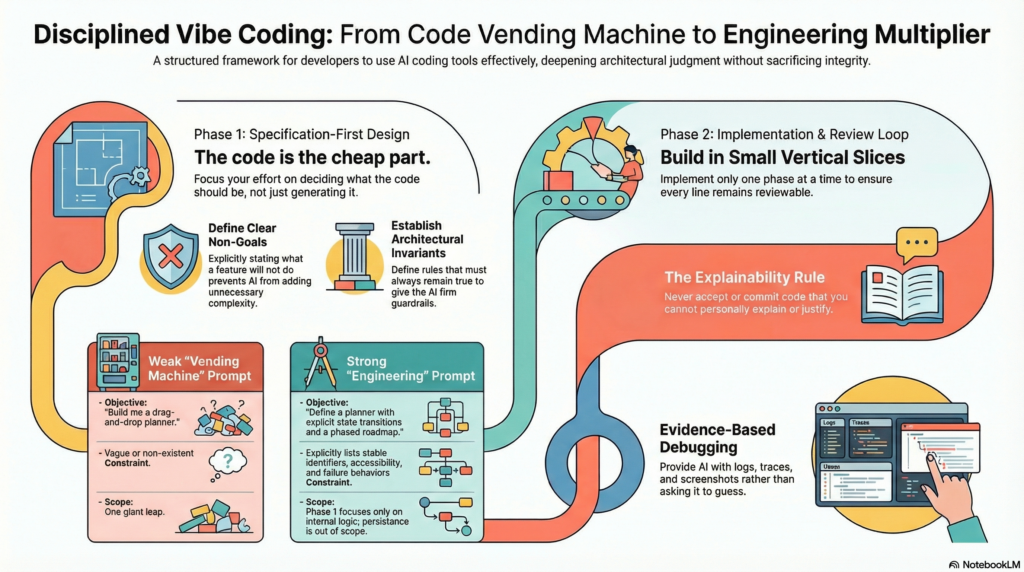
The version of vibe coding that actually works is much more disciplined. It is not about asking an AI to “build the thing.” It is about using AI as a collaborator to help you think through the thing, define it precisely, implement it in phases, review it critically, document it properly, and debug it with evidence.
That is the central idea of this article:
Successful vibe coding is specification-first, phase-based, checkpoint-driven, and documentation-rich.
Or put more simply:
Spend most of your time thinking and designing.
Spend less time generating code.
Review every phase before continuing.
Never let speed outrun understanding.
That is what turns AI from a source of chaos into a real engineering multiplier.
The biggest misunderstanding about vibe coding
A lot of people treat AI coding tools like code vending machines. They assume the main value is that the AI writes code quickly.
That is only partly true, and focusing on that is exactly what causes trouble.
The highest-value use of AI in software development is not raw code generation. It is helping with:
- clarifying the feature
- exposing missing constraints
- identifying edge cases
- decomposing work into phases
- suggesting patterns and tradeoffs
- writing and refining documentation
- generating scoped implementations
- reviewing and explaining code
- assisting with debugging once evidence exists
The code is often the cheap part. The expensive part is deciding what the code should be.
That is why the strongest AI-assisted workflows are not prompt-first. They are specification-first.
A weak workflow sounds like this:
“Build me a drag-and-drop planner.”
A strong workflow sounds more like this:
“Help me define a drag-and-drop planner with explicit state transitions, stable identifiers, event contracts, failure behavior, accessibility constraints, and a phased roadmap. Start with a minimal internal drag-and-drop implementation only. Do not include persistence or mobile gestures in phase 1.”
That difference is everything.
In the first case, the AI is forced to invent.
In the second case, the AI is guided.
And AI is much more dangerous when it is inventing than when it is implementing.
The right mindset: AI should compress effort, not replace judgment
The healthiest way to think about AI coding tools is this:
AI can help you:
- explore ideas
- challenge assumptions
- structure a design
- generate implementation drafts
- explain unfamiliar code
- improve documentation
- assist with debugging
- propose refactors
But AI does not replace:
- architectural judgment
- understanding of the system
- debugging discipline
- code review
- testing
- design responsibility
- accountability for correctness
If you use AI to avoid thinking, you will get low-quality results faster.
If you use AI to deepen thinking, you get leverage.
That is the difference between sloppy vibe coding and professional AI-assisted development.
What successful vibe coding actually looks like
A good working definition is:
Successful vibe coding is the practice of using AI to co-develop a feature specification, roadmap, implementation, and documentation one reviewed phase at a time.
That means you:
- define the feature clearly
- identify constraints, rules, and non-goals
- break the work into phases
- implement only one phase at a time
- review that phase properly
- document what was built and why
- use that checkpoint as the foundation for the next phase
This is important because one-shot generation often creates more problems than it solves.
When you ask for the whole system all at once, several things usually happen:
- assumptions get buried
- naming drifts
- interfaces become inconsistent
- too much changes at once
- review quality drops
- hidden design flaws survive longer
- later work builds on unstable foundations
The better rule is this:
Define the overall direction early, but only fully specify and implement one phase at a time.
That keeps the work understandable and reviewable.
Start with a real technical specification
The first discipline of good vibe coding is to stop treating feature ideas like specifications.
A feature idea is not enough.
A proper specification should explain:
- what the feature is
- why it exists
- who uses it
- what problem it solves
- what inputs it receives
- what outputs it produces
- what internal parts are required
- what data structures it needs
- what contracts or events exist
- what must always remain true
- how errors should behave
- what performance matters
- what is explicitly out of scope
Many failed AI-generated implementations come from skipping this stage. The prompt contains a desire, not a design.
Example: weak vs strong specification
Weak:
Build a kanban board with drag and drop.
Stronger:
Build a kanban board that supports moving cards between columns using internal drag-and-drop. Card identity must remain stable across reorders. The system must emit explicit move events with source column, target column, source index, target index, and card id. State updates must be deterministic and testable without DOM interaction. Phase 1 excludes persistence, external drag sources, virtualization, keyboard accessibility, and mobile gesture support. The implementation must include module documentation and examples.
This prompt should actually be even more detailed than I have here but I don’t want to write a book just get the idea across.
The second version gives AI something concrete to reason about. It reduces invention and increases alignment.
Define non-goals as clearly as goals
One of the easiest ways to prevent AI from creating unnecessary complexity is to define what the feature will not do.
This matters because AI is good at filling gaps. If you leave space open, it often expands scope without being asked.
Examples of useful non-goals:
- no persistence in phase 1
- no server synchronization yet
- no mobile support yet
- no plugin hooks yet
- no keyboard accessibility yet
- no external integrations yet
- no performance optimization beyond reasonable defaults yet
Non-goals keep the implementation honest and the review manageable.
They also stop a common failure mode where the first AI-generated version includes half-implemented ideas that belong three phases later.
Think globally, build locally
A strong AI workflow operates at two levels.
Global thinking
This is where you define:
- the feature goal
- how it fits the system
- major constraints
- high-level architecture
- roadmap phases
Local execution
This is where you focus only on:
- the current phase
- current contracts
- current acceptance criteria
- current code
- current documentation
This split is critical.
You want the whole direction visible, but you do not want implementation to spill across the whole roadmap at once.
That is what keeps progress structured instead of chaotic.
Build in phases, not in one giant leap
If a feature matters, it should have a roadmap.
A roadmap is not a vague wish list. It is a deliberate sequence of implementation steps where each phase is small enough to review and meaningful enough to matter.
Here is a typical structure.
Phase 1: foundations
- define core types
- define public contracts
- define state model
- define events
- define invariants
- create documentation skeleton
- create initial tests for pure logic
Phase 2: core behavior
- implement main user flow
- connect state transitions
- validate input behavior
- define error handling
- add examples
- add more tests
Phase 3: integration
- integrate with surrounding systems
- add API or persistence where needed
- connect telemetry or diagnostics
- refine docs around usage and extension
Phase 4: refinement
- optimize performance
- improve accessibility
- improve logging and traces
- improve developer ergonomics
- add polish and quality-of-life improvements
The key is that each phase should result in something coherent.
A phase should not be “some helper classes and half an event system.” A phase should produce a real, understandable slice of behavior.
Treat every phase as a checkpoint
One of the most important disciplines in successful vibe coding is the checkpoint.
Do not move from one phase to the next simply because the AI generated code quickly.
Move only after review.
Each phase should end with a checkpoint that answers:
- what was built
- what decisions were made
- what assumptions were confirmed
- what remains out of scope
- what risks remain
- what the next phase may assume
This creates stable project memory.
Without checkpoints, later prompts build on uncertain assumptions.
With checkpoints, each phase becomes trusted ground.
Example checkpoint summary
Phase 1 complete: Core drag-and-drop contracts
Completed:
BoardStatestructureMoveCardEventpayload definition- pure reducer for move operations
- event dispatcher interface
- unit tests for move validity
- module docs for state and events
Locked decisions:
- card identity is a stable string id
- move events always use canonical indices, not rendered indices
- reducer is the source of truth for reorder logic
Deferred:
- DOM integration
- persistence
- keyboard interaction
- virtualization
Known risks:
- filtered views may require index translation later
- column virtualization may affect rendered-target calculation
Phase 2 may assume:
- reducer contracts remain stable
- event payload shape remains stable
- move validation stays in pure logic, not DOM handlers
That kind of summary is incredibly valuable later.
Separate planning from implementation
One of the best habits you can build is separating thinking from coding.
Use AI first to help:
- find missing details
- expose ambiguity
- identify risks
- propose structure
- define phases
- write acceptance criteria
- challenge assumptions
Only once the phase is properly scoped should you ask for implementation.
This reduces one of the biggest failure modes in AI-assisted development: coding before the problem is understood.
Example
Bad sequence:
- ask AI to build the feature
- see what it generates
- discover the real design questions afterward
Better sequence:
- define the feature
- ask AI what is missing in the specification
- refine the constraints and boundaries
- split the work into phases
- define acceptance criteria
- implement phase 1 only
- review phase 1
- continue
This is slower at the start and much faster overall.
Choose the right model for the right task
A common mistake in AI-assisted development is using one model for everything.
Not all tasks need the same kind of model. In general terms, it helps to think in three categories.
1. Strong reasoning models
Use these when:
- architecture is unclear
- tradeoffs are subtle
- bugs are deep or non-obvious
- the feature has many interacting constraints
- you need critique more than code
Best for:
- planning
- design review
- specification refinement
- hard debugging
- refactoring strategy
- identifying invariants and failure modes
2. Fast general-purpose models
Use these when:
- the task is routine
- the scope is narrow
- you need quick iteration
- the architecture is already clear
Best for:
- ordinary coding help
- incremental changes
- small documentation updates
- writing straightforward tests
- implementing well-defined modules
3. Code-focused models
Use these when:
- the design is already decided
- the task is mostly translation from spec to code
- you want code review or code transformation
- the task is mechanical rather than conceptual
Best for:
- implementing established patterns
- converting one structure into another
- reviewing diffs
- generating boilerplate from known contracts
- consistent test generation for defined behavior
A practical rule
Use deeper reasoning for:
- planning
- architecture
- subtle debugging
- difficult design questions
Use faster models for:
- routine iteration
- small updates
- incremental refinement
Use code-focused models for:
- implementation
- diff review
- structured transformations
The most mature teams do not get emotionally attached to one model. They switch based on the shape of the work.
Define acceptance criteria before generating code
A phase should have a clear pass/fail bar.
Do not just say:
“Implement the event system.”
Say:
- consumers can subscribe and unsubscribe
- duplicate subscriptions behave consistently
- invalid payloads are rejected or normalized
- event names are documented
- tests cover success and failure behavior
- examples show usage
- no unrelated modules are changed
Acceptance criteria do three things:
- improve AI output
- improve human review
- reduce false confidence
If you cannot tell whether a phase is finished, then the phase is not specified well enough.
Separate facts, decisions, and open questions
This sounds like a small documentation trick, but it matters a lot.
One of the easiest ways for both humans and AI to get confused is when technical notes mix:
- things that are definitely true
- things that have been decided
- things that are still unresolved
A better structure is:
Facts
Things already dictated by the system, platform, product, or constraints.
Decisions
Choices the team has made and intends to follow.
Open questions
Items still under evaluation.
Example
Facts
- Cards can appear in filtered and unfiltered views.
- Each card has a stable id.
- Reorder logic must be testable without browser events.
Decisions
- Canonical order lives in state.
- Filtered views derive from canonical state.
- Drag events must translate rendered indices to canonical indices.
Open questions
- Where should index translation live: controller layer or view adapter?
- Should move events carry both rendered and canonical indices for diagnostics?
This prevents unresolved ideas from being mistaken for settled architecture.
Record why decisions were made
Do not only document what was chosen. Document why.
Bad:
- Use delegated event listeners.
Better:
- Use delegated event listeners because item counts may grow large, and attaching listeners to each child would increase overhead and complicate dynamic updates.
That “why” matters later when:
- a developer questions the design
- a refactor is proposed
- a new team member joins
- the AI suggests an alternative
- the system grows in ways the original team did not expect
If you lose the reason, you lose the architecture faster than you think.
Lock public contracts early
AI-assisted development gets much easier once public contracts are stable.
Try to stabilize early:
- public APIs
- event names
- payload shapes
- state schemas
- naming conventions
- error formats
Why this matters:
If those keep changing every phase, then every future prompt becomes harder. Tests become brittle. Documentation goes stale. Refactors become expensive. AI suggestions become less reliable because the ground keeps moving.
Stable contracts create better continuity.
Define invariants
An invariant is something that must always remain true.
Invariants are one of the most powerful tools for both design clarity and AI guidance.
Examples:
- every card has a unique stable id
- state must never reference missing entities
- a drag operation may only have one active source at a time
- rendered order must match canonical order unless an explicit transformation is applied
- event payloads must always include enough data for deterministic state updates
These statements make architecture more durable. They also give AI strong guardrails during code generation and review.
Define failure behavior, not just happy paths
A lot of people are good at describing what should happen when everything goes right.
Real systems fail in the edges.
You should define:
- what happens on invalid input
- what happens when required data is missing
- what happens when event handlers throw
- what happens when state is stale
- whether the system fails loudly or degrades gracefully
- how developers see the failure
- how users experience the failure
Example
For a drag-and-drop board:
- if the target column id is missing, the move is rejected and a warning is logged in development
- if the card id is not found, the reducer returns unchanged state and emits a diagnostic event
- if the rendered index cannot be translated to a canonical index, the action is aborted and debug logging includes filter state and rendered list snapshot
That kind of clarity reduces improvisation later.
Documentation is part of the implementation
Documentation is not optional decoration in AI-assisted development.
It is part of the feature.
For every major piece of code, documentation should include:
- what this part is
- what it does
- how to use it
- where it fits in the bigger picture
- detailed examples
- limitations
- extension points
- known risks or deferred concerns
This helps humans, but it also helps future AI-assisted work.
Documentation becomes reusable context. It preserves intent. It explains decisions. It makes later prompts better. It makes later extensions safer.
In other words:
documentation is not just explanation; it is project memory.
Example module documentation
Module: moveCardReducer
What is this?
Pure state transition logic for moving a card between columns.
What does it do?
Validates source and target positions, removes the card from the source column, inserts it into the target column, and returns updated state.
How do you use it?
Call it from UI controllers or event handlers after converting user actions into canonical move operations.
Where does it fit?
It is the core business logic for card movement. UI code should not implement reorder rules directly.
Example
const nextState = moveCardReducer(state, {
  cardId: "card-17",
  sourceColumnId: "todo",
  targetColumnId: "doing",
  sourceIndex: 2,
  targetIndex: 0
});
Limitations
- does not persist state
- assumes canonical indices
- does not handle optimistic server rollback
Known deferred concerns
- filtered views require index translation before reducer call
- future virtualization support may change how drop targets are resolved
That kind of documentation helps everyone.
Keep docs close to the code
A single master design document is useful, but it is not enough.
Each important module or subsystem should explain itself near the implementation.
Why? Because later work rarely starts from a blank page. It starts from nearby code. Future developers and future AI prompts benefit greatly from local clarity.
Local documentation reduces drift. It keeps knowledge anchored. It makes maintenance easier.
End every phase with a handoff summary
This is one of the most practical habits teams can adopt.
After each phase, create a small structured handoff.
Include:
- what was completed
- what was intentionally deferred
- what decisions are locked
- what known issues remain
- what public interfaces now exist
- examples of usage
- what the next phase should assume
- what the next phase must not change
This becomes the launch point for the next implementation cycle.
It also makes the system resilient to context loss.
The traps that make vibe coding fail
Now we get to the most dangerous part of AI-assisted development: the discipline failures.
The biggest risks are not only bad code generation. The bigger risks are the habits AI can tempt people into.
Trap 1: Not understanding the code
One of the worst habits in AI-assisted development is accepting code you do not truly understand.
Generated code can look polished and convincing while still being:
- architecturally wrong
- inconsistent with system conventions
- too abstract for the problem
- harder to maintain than necessary
- subtly buggy
Review does not mean “it seems fine.”
Real review means asking:
- Why was this approach chosen?
- Do I agree with this data structure?
- Does this fit the rest of the codebase?
- Is the abstraction justified?
- Are the names correct?
- Is this the simplest solution that works?
- Would I want to maintain this in six months?
If the answer is no, then you should not accept it just because it compiles.
You should:
- ask the AI to explain the code
- ask what assumptions it made
- ask for alternative approaches
- ask for a simpler version
- refactor the parts you disagree with
- rewrite sections manually if needed
A good rule is:
Never keep code you cannot explain.
If you cannot explain it, you do not control it.
Example
Suppose the AI generates a complex event bus with middleware, priorities, and replay buffers for a small internal UI widget.
It might look impressive. It might even work.
But maybe your real need was a very small typed callback registry.
If you accept the complex version without understanding it, you inherit maintenance burden you never needed.
The right move is to question it:
- Why do we need middleware?
- Why do we need replay?
- What actual requirement justifies priorities?
Then simplify if the complexity is not justified.
Trap 2: Letting AI replace debugging discipline
Another common trap is assuming that when something breaks, the best next step is to paste the error into AI and ask for a fix.
Sometimes that works, but often it leads to shallow guessing.
Debugging is still a discipline.
It still requires:
- reproducing the issue
- observing what actually happens
- checking assumptions
- reading logs
- stepping through behavior
- isolating the failure point
- separating symptoms from root cause
Weak AI-assisted debugging looks like this:
- error appears
- developer pastes it into AI
- AI suggests a plausible fix
- developer tries it
- a different error appears
- repeat
That is not debugging. That is roulette.
The better process is:
- reproduce the issue consistently
- gather logs, state, traces, screenshots, or metrics
- identify where expected and actual behavior diverge
- form a theory about the root cause
- use AI to challenge, refine, or help validate that theory
The more you can tell AI about what you observed, the more useful it becomes.
Example: a timing issue in web development
This is a perfect example of something an agent may not infer from static code alone.
Imagine a web app where a dropdown closes immediately after opening.
Looking only at the code, the AI might suggest:
- event bubbling issue
- incorrect state update
- stale closure
- wrong dependency array
All plausible.
But the real issue may be timing:
- the dropdown opens on
pointerdown - a global outside-click handler runs on the same interaction cycle
- a microtask or deferred state update causes the open state to be visible too late
- the outside-click logic sees the old DOM state and closes the menu instantly
That kind of problem often cannot be understood from code alone. You need evidence:
- event order logs
- timestamps
- a debugger
- maybe a performance trace
- maybe a video or screen recording
A good debugging note to AI would be:
The menu opens on
pointerdown, but closes during the same interaction. Logs showopenMenu()fires first, then the outside-click handler runs before the next paint. The DOM node for the menu is not yet present when the outside-click logic checks containment.
That is dramatically more useful than:
“The dropdown keeps closing. Fix it.”
AI can help a lot here, but only after real debugging work exists.
Trap 3: Underestimating screenshots, traces, logs, and instrumentation
If you want good help, you need good evidence.
This is true for humans and just as true for AI.
Useful artifacts include:
- screenshots
- screen recordings
- console logs
- structured application logs
- stack traces
- network traces
- memory snapshots
- performance traces
- state dumps
- timing information
- profiler output
Without evidence, people speculate.
With evidence, people reason.
Why screenshots matter
For UI work, screenshots can reveal:
- layout bugs
- overflow problems
- missing states
- visual regressions
- incorrect rendering order
- spacing or interaction issues
An AI reading code may miss that:
- the tooltip is behind a modal
- the sticky header overlaps content only at certain widths
- the skeleton loader never disappears visually even though state changes are correct
- the scroll container clips an absolutely positioned menu
A screenshot makes those issues concrete.
Why trace logs matter
For performance work, traces are often essential because they show:
- where time is really being spent
- which handlers fire too often
- whether layout thrashing is happening
- whether rendering work is duplicated
- whether network delay or main-thread blockage is the problem
- whether garbage collection spikes exist
An AI reading code may suspect inefficiency, but traces show actual behavior.
Why logging matters
For logic problems, structured logs can reveal:
- which inputs arrived
- which branch executed
- what state changed
- where a value became invalid
- how event order behaved
- when expectations diverged from reality
This is why observability should be treated as part of engineering, not an afterthought.
If a feature is worth building, it is worth making observable.
Example: performance problem in a web app
Suppose typing into a search box feels laggy.
The AI may look at code and say:
- maybe the filter function is slow
- maybe too many components re-render
- maybe debouncing is needed
All plausible.
But a performance trace may show the real problem:
- every keystroke triggers synchronous layout reads
- a heavy canvas redraw runs on each input event
- a “harmless” log serializer deep-clones 10,000 records in development
- state updates cascade into multiple expensive derived selectors
That is why trace evidence matters.
A much better debugging brief would be:
Typing in the search box causes 80–120 ms stalls on each keystroke. Performance trace shows repeated layout recalculation and canvas redraw inside the input handler. The expensive path begins in
updateVisibleRows()and triggers three synchronous measurements before paint.
Now the AI can help meaningfully.
AI is strongest when paired with evidence and judgment
The same pattern shows up again and again:
AI does not remove the need for:
- understanding
- review
- debugging
- evidence
- instrumentation
In fact, AI works best when those things are already present.
The more clearly you can describe:
- what you expected
- what happened
- what you measured
- what changed
- what the logs show
- where timing diverges
- where performance is lost
the more useful AI becomes.
AI is not strongest when you know nothing.
AI is strongest when you know enough to ask better questions.
Use AI to challenge your thinking, not only to write code
One underrated use of AI is design critique.
Before implementation, ask questions like:
- What constraints am I missing?
- What failure modes am I not thinking about?
- What invariants should I define?
- What is over-engineered in this design?
- What simpler architecture could still satisfy the requirements?
- Which parts should be public contracts and which should stay internal?
- What will become painful to change later?
This makes the design stronger before any code is written.
AI is often most useful when it is challenging your assumptions rather than merely following your instructions.
Decide where AI is allowed freedom
Another underrated best practice is being explicit about where AI may or may not make decisions.
For a given phase, specify whether AI may:
- choose internal data structures
- rename things
- introduce abstractions
- add dependencies
- refactor surrounding code
- optimize performance
- alter existing public contracts
If you do not define this, the AI will guess.
Example
A good instruction might be:
You may refactor internal helper functions in this module for clarity, but do not change public type names, do not add third-party dependencies, and do not refactor unrelated files.
That one line can prevent a lot of collateral damage.
Add a “do not change” section
This is especially helpful during iterative development.
Examples:
- do not rename public APIs
- do not modify persistence behavior in this phase
- do not introduce new dependencies
- do not refactor unrelated modules
- do not change event payload structure
- do not alter existing tests unless they conflict with approved acceptance criteria
These boundaries make reviews smaller and make AI behavior more predictable.
Prefer small vertical slices over scattered internals
A phase should ideally produce a meaningful, testable slice of functionality.
Good:
- a working internal drag-and-drop flow for one board with tests and docs
Less good:
- partial event primitives
- half a controller
- no usable interaction
- no docs
- no clear way to verify the behavior
Small vertical slices are easier to reason about because they connect design, code, tests, and documentation in one place.
They also give better feedback sooner.
A practical workflow developers can use
Here is a strong default process.
Step 1: clarify the feature
Use AI to turn a rough idea into a technical specification.
Questions to ask:
- What are the missing constraints?
- What are the non-goals?
- What invariants should exist?
- What are the likely failure modes?
- What would a clean phased roadmap look like?
Step 2: refine the design
Use AI to critique your plan.
Ask:
- What seems over-engineered?
- What assumptions are unstable?
- What public contracts should be fixed early?
- What data structures are most suitable?
Step 3: define the roadmap
Split the feature into phases.
For each phase define:
- scope
- non-goals
- acceptance criteria
- tests
- documentation required
- what must not change
Step 4: implement one phase
Generate only the current phase. Keep the task bounded.
Step 5: review the result
Review:
- correctness
- fit with the architecture
- naming
- complexity
- contracts
- tests
- documentation
Ask questions. Challenge the code. Simplify where needed.
Step 6: debug with evidence
If the phase does not work:
- reproduce the issue
- gather logs
- gather traces
- gather screenshots if relevant
- isolate the problem
- then use AI to help reason about it
Step 7: checkpoint
Document:
- what is now true
- what is deferred
- what is locked
- what remains risky
- what the next phase may assume
Step 8: continue
Only then move to the next phase.
What developers should stop doing
If teams want to succeed with AI coding tools, they need to stop doing these things:
- asking for giant systems in one prompt
- accepting code they do not understand
- using AI as a substitute for debugging
- skipping acceptance criteria
- moving to the next phase without review
- relying on memory instead of documentation
- feeding AI messy, outdated context
- letting the AI refactor unrelated code
- using the same model for every task
- postponing observability until after bugs appear
These are the habits that create most “AI coding went badly” stories.
A final example: how a disciplined vibe coding workflow looks in practice
Let’s take a realistic feature: a filterable web-based task board with drag-and-drop.
Poor workflow
- ask AI to build the board
- accept whatever it generates
- discover later that filtering breaks drag indices
- discover later that event timing causes flicker
- discover later that performance degrades with 1,000 cards
- discover later that no one understands the code
Better workflow
Specification
Define:
- stable card ids
- canonical vs rendered order
- drag event contract
- filter interaction rules
- error behavior
- non-goals for phase 1
Phase 1
Build:
- pure state model
- move reducer
- event payload definitions
- docs and examples
- reducer tests
Phase 2
Build:
- UI integration for unfiltered board
- drag handlers
- event sequencing logs
- screenshots for expected states
Phase 3
Build:
- filter-aware index translation
- diagnostics for rendered vs canonical mismatch
- tests covering filtered movement
Phase 4
Build:
- performance profiling
- virtualization or optimization if needed
- trace-based fixes
- expanded developer docs
Debugging example
Bug appears: card drops into wrong position only when filtered.
A weak AI prompt:
Drag and drop is broken.
A strong AI prompt:
In filtered mode, the rendered list contains a subset of canonical cards. Drop target index is computed from rendered order, but reducer expects canonical index. Logs show source card id is correct, target column id is correct, and rendered target index is 1, but canonical insertion point should be 4. Please suggest a clean translation strategy without changing reducer contracts.
That is how you use AI well.
The bottom line
The best way to succeed with vibe coding is to stop thinking of it as “getting AI to write code.”
That framing is too small, and it encourages the wrong behavior.
The better framing is this:
AI-assisted development works best when it is specification-first, phase-based, checkpoint-driven, evidence-backed, and documentation-rich.
Use AI to think better.
Use AI to plan better.
Use AI to implement smaller, cleaner slices.
Use AI to document the system as it grows.
Use AI to help reason about bugs after you have gathered evidence.
Use AI to challenge your assumptions, not just obey your prompts.
And most importantly:
Never let speed outrun understanding.
That is the real secret.
Good vibe coding is not passive acceptance of generated code.
It is active collaboration: careful specification, critical review, disciplined debugging, strong observability, and phased execution.
Do that, and AI stops being a novelty.
It becomes part of a serious engineering method.